The Contact Form 7 AutoResponder Addon plugin allows you to automatically add people to your MailChimp list after they’ve sent you a message using your CF7 form.
This useful little plugin currently supports addition of subscribers to MailChimp lists.
In upcoming versions, there will be other AutoResponders added to the functionality subject to feedback and demand.
The plugin is easy to use and it uses the submitted email and name fields from the basic CF7 form to insert these details into your MailChimp list.
This plugin works for the default CF7 form which has the following fields:
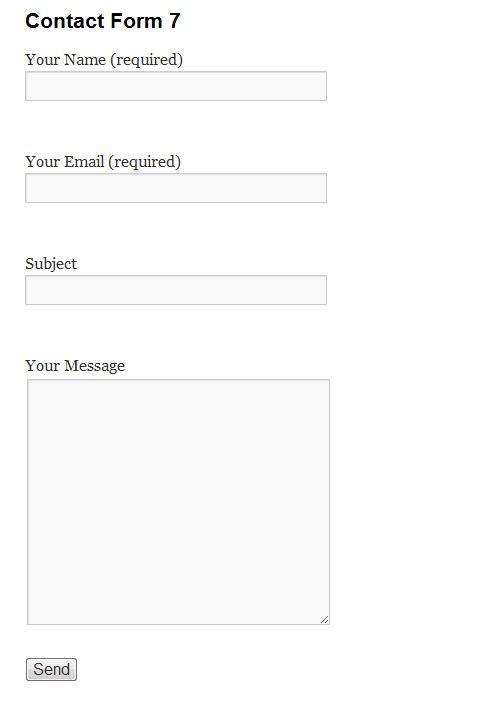
The plugin will read the submitted values for the “Your Name” and “Your Email” fields in the above default CF7 form. Note that these fields have the “name” parameter set to:
“your-name”
“your-email“.
If you wanted to use a slightly more customized form whereby instead of using just a single name field you wanted to use “first name” and “last name” in addition to the email field, then this plugin will also read these fields as long as you use the following “name” settings for these fields:
“your-first-name”
“your-last-name”
“your-email”
You can also add a checkbox to your CF7 form with the “name” parameter set to “mc-subscribe” with a label saying something like “Subscribe Me To Your List”.
This will then give your visitors the option of whether they want to subscribe to your list or newsletter or whatever, after submitting the CF7 form.
If this checkbox is present and it is enabled and provided the “Enable Mailchimp List Insertion” is also enabled, the plugin will allow the subscription to occur, otherwise it will not.
If by default you do not have the “mc-subscribe” checkbox in your form and the “Enable Mailchimp List Insertion” is also enabled, then subscription will occur by default.
Download the CF7 AutoResponder Addon Plugin for FREE.
Installing the CF7 AutoResponder Addon Plugin
- FTP the
cf7-autoresponder-addonfolder to the/wp-content/plugins/directory, OR, alternatively, upload thecf7-autoresponder-addon.zipfile from thePlugins->Add Newpage in the WordPress administration panel. - Activate the cf7-autoresponder-addon plugin through the ‘Plugins’ menu in the WordPress administration panel.
Using The CF7 AutoResponder Addon Plugin
Pre-requisites:
- You must have Contact Form 7 plugin installed and activated
- The forms which you want to use to add people to your MC list have been configured via the Contact Form 7 plugin.
- Your CF7 forms have been configured with the correct naming conventions for the name field, eg:
“your-name” (if you’re using a single name field)
“your-first-name” (if you’re using a first name field)
“your-last-name” (if you’re using a last name field)
“mc-subscribe” (if you want to give your visitors the option to choose to subscribe to your list using a checkbox)
1. CF7 AutoResponder Addon Config Page
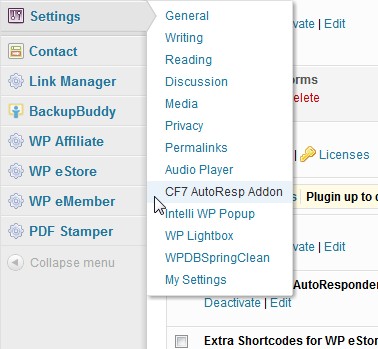
After you’ve installed and activated the CF7 AutoResponder Addon plugin, go to the Settings menu and choose CF7 AutoResp Addon as shown below:
2. Configuration Settings
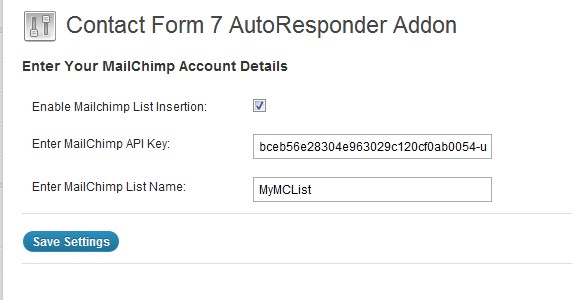
Configure the plugin by entering the following settings (see screenshot below):
- Enable the check-box called “Enable Mailchimp List Insertion”. This will activate the automatic insertion of people to your MailChimp list when they send you a message via the Contact Form 7.
(Note: if you would like to temporarily disable the adding of people to your list, simply uncheck the flag) - Enter your MailChimp API key
Note: Your MailChimp API Key can be obtained when you log into your MailChimp account. It can be found under the “Account” tab. By default the API Key is not active so make sure you activate it. - Enter your MailChimp list name.
Note: You would have specified this in your MailChimp account when you created the list. Ensure that you enter the correct name because if you mispell the name or provide an incorrect list name, the CF7 AutoResp Addon plugin will not be able to add your client to your list.
And that’s it! Now whenever anyone leaves a message on your site using the Contact Form 7, they will automatically be added to your MailChimp list, OR, you can give your visitors the choice to subscribe by using the checkbox described in the pre-requisites section.
Please be aware that in order for someone to be added to your list, they will firstly need to confirm the subscription by clicking on the appropriate link in the “confirmation” email which is sent by MailChimp.
Using different list names based on the CF7 form
Normally people are subscribed to the global MailChimp list name which is specified in the main settings of this plugin.
However if for example you have more than 1 list in your AWeber or GetResponse or MailChimp accounts and you wish to add people the different lists, you can do so with this plugin based on the form you are using.
For example if you have 3 different CF7 forms on your site, you can use each form to add people to 3 separate lists whereby each CF7 form can be configured to specify an autoresponder list name.
To do this you simply need to modify the submit button code of the relevant CF7 form by adding an extra parameter.
For example a typical submit button code for a CF7 form looks like the following:
[submit “Send”]
Now if you wanted to use that particular CF7 form to add someone to a different list from the one specified in the global settings of this addon, you simply need to modify the submit code as follows for the CF7 form you are interested in:
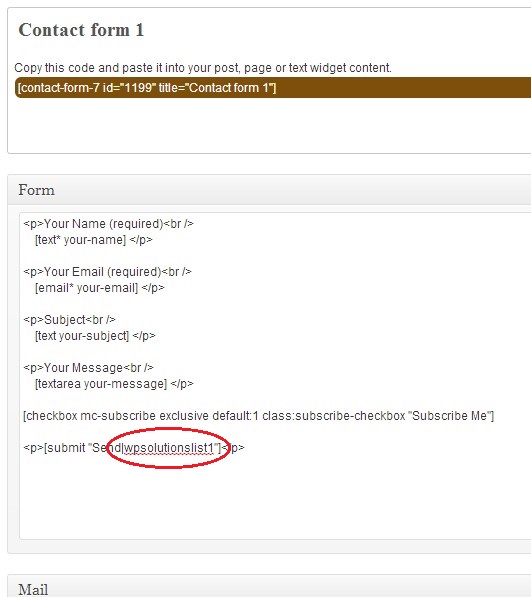
[submit “Send|wpsolutionslist1“]
Note that we’ve simply added a “pipe” character “|” followed by the list name which in our example is called “wpsolutionslist1” to the name of the button.
Here’s an actual example of a CF7 form config where we want to subscribe people to a list called “wpsolutionslist1”:
The above method will allow you to subscribe people to specific list names based on the CF7 form they are using. This means you can conveniently insert people to more than one list depending on the form they fill in.
 Marek Kaduh says
October 7, 2015 at 6:34 amHello, I have problem with auto adding subs. to list in Mailchimp but I can see those contacts in COntact form DB. Can you help me ? API key and ID of list is corect.
Thank you
 kuldeep says
April 23, 2015 at 10:13 pmHI sir,
i am using contact7 autoresponder for newsletter.I am having adding a radio field in mailchimp,
[email* email-172 placeholder “Enter your valid email”]
Do you currently use organic fertilizers or nutrients in for your growing needs ?.
[radio radio-437 class:check label_first “Yes” “No”]
[checkbox mc-subscribe exclusive default:1 class:subscribe-checkbox “Subscribe the Newsletter”]
[submit class:sub “Submit|MYMCLISTS”]
Unfortunately the value aren’t added to list “MYMCLISTS”
The insertion of custom tags is working with radio button ?
pls provide me solution asap
thanks in advance
 Matt says
April 21, 2015 at 8:18 pmHello,
This looks like a great wp plugin. I’m using a form to sign up for mailchimp currently on my website (an association), means it only provides name & email.
Now, we have a form where new people can sign up for the association (not just newsletter). We would like to use mailchimp for that (with a different list) but it would also need to store all the information, there are several textfields as well as some radio and checkboxes. Also some how the plugin needs to send the form to an email address, not only to mailchimp.
Thank you,
Matt
 Matt says
April 21, 2015 at 8:35 pmYou can delete my post, I already found the feature with the MCTAG fields, perfect! Thanks
 Christian says
March 13, 2015 at 6:05 amHi,
Getting a couple of warnings after activating the plugin with the last version of WordPress:
Notice: Undefined variable: errors in /wp-content/plugins/contact-form-7-autoresponder-addon-plugin/cf7_autoresponder_addon.php on line 59
Notice: Undefined index: disable-double-opt in /wp-content/plugins/contact-form-7-autoresponder-addon-plugin/cf7_autoresponder_addon.php on line 78
 Andrew says
February 12, 2015 at 2:19 amHi, Peter!
Your plugin work great!
But I have a problem. I checked “disable double opt” and tested to register on my site as some user. It seemed that it still required the double opt because I got confirmation e-mail for the subscribtion and my e-mail haven’t been added to the list I specified.
 Dave says
February 11, 2015 at 10:32 amHi, hope you can help…
This plugin is perfect for what I need, but I’m having some issues:
When I submit a form that includes a subscribe checkbox, and the checkbox is ticked:
– the email message is sent (as expected)
– the email address is added to the list in MC (as expected)
– But I get the CF7 perpetual spinning arrows
– …and the CF7 confirmation message box doesn’t appear
When I submit a form that includes a subscribe checkbox, and the checkbox is NOT ticked:
– the email message is sent (as expected)
– the email address is not added to the list in MC (as expected)
– No CF7 perpetual spinning arrows (as expected)
– CF7 confirmation message box appears (as expected)
When I submit a form that DOESN’T include a subscribe checkbox (i.e. standard contact form):
– the email message is sent (as expected)
– the email address is not added to the list in MC (as expected)
– But I get the CF7 perpetual spinning arrows
– …and the CF7 confirmation message box doesn’t appear
If I deactivate your plugin the normal contact form works fine.
Can you offer some advice as to where I am going wrong? Thanks!
 Judah says
January 31, 2015 at 11:44 amI am having an issue with adding the user to specific lists in mailchimp.
I have successfully added a user to my mast mailchimp list but when I enter the `|` and the list name, it won’t work.
Here is the submit button I am trying to use.
[submit id:submitbuttoncontactform “subscribe|blog subscription”]
Does capitalization matter? What about the space in between the words in the list name?
Your help is appreciated!
 Azzeddine says
January 12, 2015 at 10:55 amHello !
Can i change “your-name” field by a list box !?
Thanks.
 Marjan says
December 1, 2014 at 9:39 pmCan I disable the Autoresponder option for some forms? I have a normal contactform for people wanting to ask me questions, I do not want them to go through a whole signup process.
Thanks,
 peter says
December 3, 2014 at 10:01 amHi,
Yes that’s very easy to do. For the forms which you don’t want to use with your autoresponder, simply name the “your-email” field to something else, eg, “enter-email”.
The plugin will automatically ignore any forms which do not have a field named “your-email”.
 Jack Kennedy says
November 19, 2014 at 2:41 pmHi,
Great plugin but I am having a slight issue. I have the emails sent to our events coordinator and she reckons she only receives 1/3 of the emails. It is very hit and miss and there is no visible pattern. The integration with mailchimp works 100% though. I have tested the plugin using a range of variables and every time I try it works fine for me! Weird!
Would you have any ideas?
Kind Regards,
Jack
 peter says
December 3, 2014 at 10:02 amHi Jack,
Which emails are you referring to? The autoresponder emails or the emails from the Contact Form 7 plugin?
Thanks,
Peter
 Olivier B says
November 13, 2014 at 11:46 pmHi,
Got a strange problem on trakk.be (the form is at the bottom.):
All worked well since af few days but now often when submitting the form, i don’t get any confirmation / error message. Data seems to be submitted thou as it appears in Mailchimp’s targeted list. Seems to me like an event problem.
I checked the plugin’s log but see no particular line.
I am wondering if there is a timeout/slowdown happening on the API’s side ? Anyone else experiencing this ?
 peter says
November 18, 2014 at 7:15 pmHi Olivier,
Is this issue still occurring on your site?
Thanks,
Peter
 Tomek says
November 2, 2014 at 11:36 pmThanks so much for this autoresponder plugin!! Thanks.
 Vlad says
October 26, 2014 at 9:29 pmThanks for a great plugin. Everything work great, but I can’t make custom field and tags working. I’ve created a field Referral in MailChimp, it has REF name or MERGE3 tag. I’ve tried to Add extra “email” field to Contact Form 7, give this field MCTAG-REF name and Submit this form. your-email field goes to MailChimp list without problems, but REF field is not sent and stays empty in MailChimp :(
 peter says
November 9, 2014 at 11:35 amHi Vlad,
Please see the email reply I sent you.
Thanks,
Peter
 asdmar says
October 16, 2014 at 8:17 pmhi,
I am having adding a radio field in mailchimp, with the tag name “MERGE2”
next I’ve adding the radio button in contact form 7 with the following line:
[email* your-email placeholder “E-mail”]
[radio MCTAG-MERGE2 “Privato” “Azienda”]
[submit id:myButton1 “Submit|Newsletter”]
[checkbox* mc-subscribe exclusive default:1 class:subscribe-checkbox “text”]
Unfortunately the value aren’t added to list “Newsletter”
The insertion of custom tags is working with radio button ?
thanks
 peter says
November 9, 2014 at 11:37 amHi asdmar,
Can you please check the plugin’s log file to see if there are any logs produced?
Thanks,
Peter
 Salomon says
October 5, 2014 at 4:35 pmhi, im tryng to use this plugin
after set up, once a person sends a contact form, nothing is added to my mail chimp list, and i can see an error on mail chimp
Date/Time Result Throttled? Source IP Method Format Exec Time User Agent Ver Response
2014-10-05 05:30:35 GMT nope 162.144.41.202 lists/subscribe json 0.064s MailChimp-PHP/2.0.4 2.0 (250) List_MergeFieldRequired
2014-10-05 05:30:35 GMT nope 162.144.41.202 lists/merge-vars json 0.016s MailChimp-PHP/2.0.4 2.0 n/a
2014-10-05 05:30:35 GMT nope 162.144.41.202 lists/list json 0.05s MailChimp-PHP/2.0.4 2.0 n/a
What am i doing wrong ?
Thanks in advance
 peter says
October 6, 2014 at 12:26 pmAccording to the output you provided (ie, “List_MergeFieldRequired”), it looks like you aren’t sending one of the required fields to mailchimp.
If you are not using the latest version of this plugin I suggest that you install it and then following the instructions in section called “How to insert custom tags and field values to your mailchimp list from the CF7 form” on this page.
 Andreas Hartanto says
September 10, 2014 at 8:44 pmHi support,
I only recieve the email confirmation but no name is added to Mailchimp list.
How can i check the error log?
Thanks.
 peter says
September 26, 2014 at 10:54 amHi Andreas,
If there were any logs produce there will be a log file called cf7_autoresp.log in this plugin’s directory.
Check if there are any logs inside that file.
Thanks,
peter
 andre says
September 4, 2014 at 5:32 amHello,
Just wanted to now if you have added the ability to read custom fields other than the name and email yet?
 Eugenio says
May 19, 2014 at 8:06 pmHello, I’m trying to make the autoresponder addon work but without luck.
I have a form and i was customizing it adding the your-name and your-email tags but nothing happens.
I know it’s a little bit complicated form, how can i make it work?
Here is the form:
Name*
Email*[email* email-316 placeholder “Email”]
Confirm Email* [checkmail checkmail-700 “email-316”]
Message[textarea textarea-631 placeholder “Your message”]
[acceptance acceptance-138 default:on]
I agree to the Terms and Conditions and I have read the Privacy Policy
[submit class: a_demo_one “Send”]
Thank you so much
 peter says
May 20, 2014 at 9:56 pmFirstly have you tried a test with a simple form (just name and email)?
Also have you checked if there are any logs in this plugin’s directory?
 Sally Pilkington says
May 17, 2014 at 2:56 amI had this plugin working, but now I only recieve the email confirmation but no name is added to Mailchimp list. I have re-installed the plugin, but no joy. All the settings are correct: API / list name / Enable mailchimp insertion…
2 possible causes:
– I’ve just upgraded To WP 3.9.1
– I’ve just put site live from development domain to main domain…
Here is my form code from the contact form 7 page, which was previously working – note that instead of separate labels for each field I just have placeholder text
[email email id:email class:email placeholder “Email Address”]
[submit “Sign up”]
Any ideas? as I said, I get the email, just no signup
 Sally Pilkington says
May 17, 2014 at 3:00 ammy form code again…
[email email id:email class:email placeholder “Email Address”]
[submit “Sign up”]
 peter says
May 20, 2014 at 9:53 pmHi Sally,
Can you please check if there are any logs produced by the plugin? (see this plugin’s folder)
 Sally Pilkington says
May 28, 2014 at 9:51 pmHi,
I can’t find an error log file in the Plugin folder.
I’ve also tried creating a new api in Mailchimp and using that.
Can you think of anythig else that could be causing the problem? Maybe it’s clashing with another Plugin?
Many Thanks
 peter says
May 30, 2014 at 10:10 amHi Sally,
What is the behaviour you are seeing currently?
Have you also checked your server logs?
Another thing to check is that your mailchimp list does not contain within it a mandatory field which it is expecting. Log into your mailchimp dashboard to confirm this.
 Skylar says
May 16, 2014 at 6:02 amI have a contact form 7 setup with Name and Email sections. I downloaded this plugin, added the API Key, List Name, and checked the Insert into Mailchimp checkbox. When I fill out the form, nothing get’s inserted into my Mailchimp database. Did I miss a step?
 peter says
May 16, 2014 at 9:56 amHi Skylar,
Please look in this plugin’s directory and check if there are any logs produced.
Also, can you provide a link to your form so I can see it?
 Skylar says
May 15, 2014 at 7:09 amI am trying to set this up. I have input my API Key, and my contact for “Info Package”. I checked “enable mailchimp list insert”. I only have a name and email section, neither are inserting into the mailchimp list.
Not sure where I am going wrong here. Any help?
 Skylar says
May 15, 2014 at 7:11 amSorry, meant to say I have inserted my API Key and my List Name* “Info Package”. I also tried the unique id number for my list and that didn’t help.
 Nick says
May 3, 2014 at 12:16 amHi. Great plugin, but I’m having one issue: I receive the usual email from Contact Form 7, and the subscriber’s email has been added to my list in Mailchimp, but their contact info isn’t. I’ve got a form that includes first name, last name, and business name. That info comes to my email, but isn’t populated in Mailchimp. This is the form: http://www.revenginemarketing.com/the-ultimate-guide-to-managing-your-lead-sources/
Any idea what I’m doing wrong?
 peter says
May 13, 2014 at 10:21 amHi,
Currently any extra fields other than email, first/last name are not supported.
I am planning on adding functionality to support custom fields soon.
 Merv says
June 14, 2014 at 7:29 amDo you have any E.T.A on when this will be implemented ?
Kind regards,
 peter says
June 25, 2014 at 4:08 pmHi Merv,
Sorry for late response – I have been snowed under with other work.
I will try and implement something within 2 weeks.
Thanks,
Peter
 Madz says
July 7, 2014 at 10:30 amHi Peter, great work! I’ve been searching for a plugin to integrate CF7 to Mailchimp and I’m glad I found yours. It worked the first time but did not anymore after I added extra fields..it would be great to have the plugin support other fields than names and email.
Again, great work!
 Alex says
November 9, 2014 at 7:08 amYeah, great add-on! … so is it possible to set Lead Source (segment) now?… and if so.. how is it done?
 peter says
November 9, 2014 at 11:35 amHi Alex,
No segments have not yet been added as a functional component.
It is on my “to-do” list :)
Thanks,
Peter
 Rafael says
April 30, 2014 at 2:19 amCongratulations on the plugin.
I think it will help a lot to many people.
For me, I fail to operate.
What can it be? I use the last two versions of plugin.
Best regards
Rafael
 peter says
April 30, 2014 at 10:08 amHi,
Check if there are any logs produced in this plugin’s directory and let me know what they are.
 Antony says
April 20, 2014 at 8:50 pmHi Peter,
Firstly, great plugin, really useful. Unfortunately I am having trouble adding a custom checkbox field to the contact form. This is to allow users to check if they want to be contacted by third-parties and the value passed onto a Merge field in Mailchimp.
CF7 code:
[checkbox your-third-party use_label_element exclusive default:1 “I am happy to also receive information from carefully selected third parties”]
PHP added to cf7_autoresponder_addon.php
if ( array_key_exists(‘your-third-party’, $cf7->posted_data) )
$thirdparty = $cf7->posted_data[‘your-third-party’];
else
$thirdparty = ‘No’;
$mergeVars = array(
‘FNAME’=>$firstname,
‘LNAME’=>$lastname,
‘THIRDPARTY’=>$thirdparty,
);
My Mailchimp Merge field is called THIRDPARTY so that should tie up correctly. The if statement is always true and the $thirdparty variable contains no data from the $cf7->posted_data[‘your-third-party’] array.
Any pointers you could offer with this would be greatly appreciated. There is a test page at http://sa.antonywalton.com/?page_id=792
Thanks,
Antony
 Anh-Tuan Gai says
April 2, 2014 at 7:29 pmHi Peter, thank you for the plugin. However, I can’t make it work.
Maybe it is related to Mailchimp API new version (2.0).
The plugin uses v1.3 while it says its deprecated on Mailchimp.
I can see the API call in Mailchimp API call history, but there is no new email in my list.
FYI: I tested with and without double opt in option. no logs in the plugin dir.
 peter says
April 3, 2014 at 3:14 pmThe plugin will still work with the deprecated API but I will try and make some time soon and I will update the plugin to use the latest version.
In your case, to troubleshoot further check the following:
– the list name is typed correctly exactly how it appears in your mailchimp dashboard
– check that your list does not have any mandatory fields. If it does set them to optional.
 peter says
April 6, 2014 at 11:40 amI have recently released a new version with the latest API (v2.0).
http://wordpress.org/plugins/contact-form-7-autoresponder-addon-plugin/
 Holly says
March 6, 2014 at 7:02 amAny way to change the field names in this plug in? I already have my contact form set up to populate my studio management program, and the field names are “FirstName” instead of “Your_first_name”. Thanks!!
 Alister says
February 16, 2014 at 10:52 amCF7 v3.7
CF7 Autoresponder 1.6
1) Any way to avoid the form to “stall” when submitting an already suscribed email?
2) When using mc-subscribe (on by default), if I unmark the checkbox, the CF7 submit button gets disabled too! Cannot submit the form unless the checkbox is on.
Best regards,
Alister M.
 peter says
February 25, 2014 at 2:32 pmCan you provide a link to your form so I can take a look?
 Angela says
February 10, 2014 at 8:14 amHi, I tried adding this to my word press site. But I am not able to get it to work.
The contact form 7 sends the email but it never subscribes the person to the list.
I am asking for manual subscription not autosubscribe.
What am I missing?
Name *
Email *
[email* your-email]
Phone*
[tel* phone]
Subject*
[select* subject include_blank “Classes/Workshops” “custom Packages” “Healings” “Hypnotherapy” “Medium Readings” “Ministry Services” “Other” “Psychic/Tarot Readings” “Rental Space” “Spiritual Guidance”]
Best Time to Contact*
Message*
[textarea* message]
Subscribe Newsletter
[checkbox mc-subscribe “Yes”]
[submit “Send”]
 peter says
February 11, 2014 at 2:54 pm@Angela,
Have you checked if there are any logs in the plugin’s folder?
 Leanne says
February 5, 2014 at 5:02 amHi, I have had this plugin working successfully on a number of forms on my site until I updated my Contact Form 7 to version 3.7 – now I find that even if the “subscribe” check box is NOT ticked it is still subscribing the person to the mailing list?
 peter says
February 5, 2014 at 11:02 pmI have fixed this and released a new version.
Please update to the latest version from your admin panel or get it from here:
http://wordpress.org/plugins/contact-form-7-autoresponder-addon-plugin/
(Seems like the latest version of CF7 had some change which affected my plugin)
 Leanne says
February 6, 2014 at 11:25 amThank you so much for your prompt response, it is working perfectly again :-)
 Mel says
December 31, 2013 at 9:04 amDoesn’t work for me. I never get a email confirmation from GetResponse. It’s not working at all. Help!
I’m using my Campaign Name, not Campaign Title… correct? Neither seems to work anyway.
 peter says
December 31, 2013 at 10:34 amHi Mel,
Just to confirm, are you using the premium version of the autoresponder addon plugin?
If so, have you checked the log file in this plugin’s directory to see if there are any logs produced?
 Ema says
November 12, 2013 at 11:40 pmis the a way to send to mail chimp as well extra field like “your-country”? or just the standard “your-first-name” “your-last-name” “your-email”
Thanks
em
 Ryan McCarthy says
December 5, 2013 at 9:16 ambump – I am having the same issue.
 peter says
December 5, 2013 at 10:09 amHi guys,
The plugin currently only caters for name and email address.
To add extra fields you would have to modify it.
See this comment for a general idea of how:
http://wpsolutions-hq.com/plugins/contact-form-7-autoresponder-addon/#comment-11605
 Tom says
October 24, 2013 at 6:03 amI have installed a contact form that integrates with Mailchimp, and one contact form that sends the message to an email.
The problem is that both forms are going to mailchimp. Is there a way I can fix it so the basic contact form doesn’t go to mailchimp. Any ideas?
Tom
 peter says
October 24, 2013 at 11:16 amTo exclude certain forms from adding people to your lists, simply use a different naming string for the email and name fields.
Example:
instead of “your-name” and “your-email”, change it to “your-name-form-1” and “your-email-form-1”
(the above is just an example and you change the string to whatever you want).
I hope that helps.
Thanks,
Peter
 Eloise says
October 21, 2013 at 8:56 pmHi, I am also having the same problem with my subscribers not showing up in my mail chimp list. I have checked the directory and it has cf7_autoresp.log. The log says:
Unable to load listSubscribe()!
Code=214
Msg=eloise@totem-marketing.com is already subscribed to list WarmProspectSchools. Click here to update your profile.
It says I’m already subscribed to the list but its only me in there atm and when I click to view subscribers it says there is none. Very weird!
 peter says
October 24, 2013 at 11:22 amHi Eloise,
Try another test using a completely different email address.
Also remember that you subscribers will need to “opt-in” in order for them to be added to your list. In other words when they get the mailchimp email which asks them to “Please Confirm Subscription” they will need to click the button in order to be added to the list.
You can bypass this step by enabling the “Disable Double Opt-in Email” checkbox in this plugin’s settings but be mindful that MailChimp can suspend your account if you abuse this too much.
Thanks,
Peter
 Daniel Stover says
February 17, 2014 at 6:05 amI am getting the same exact error in my logs. These are coming from new clients so its not just me testing. I have also ticked the “Disable Double Opt-in Email”. All that is uploaded is the email to my mailchimp. Nothing else is uploaded.
 Liz says
September 9, 2013 at 8:05 amI am trying to use your autoresponder plugin to add subscribers to mailchimp and it appears to work, but it doesn’t show the actual subscribers in mailchimp. the number goes up when i add a test subscriber, but i can’t actually view the subscribers. why is that? It lets me send the email just fine as well, but i would like to be able to view my subscribers. what can i do?
 peter says
September 12, 2013 at 12:02 pmHi Liz,
Sometimes the plugin will generate logs.
Can you please check this plugin’s directory and let me know if any logs have been produced?
 Abbey says
July 31, 2013 at 7:21 amHi, is there a way to modify the field names or maybe a workaround to allow custom field names? An example would be a field name of your-first-name to FirstName.
Thank you.
 peter says
July 31, 2013 at 9:09 amHi Abbey,
The only workaround for your situation is to modify the CF7 Mailchimp Addon plugin.
For example, FTP the file called “cf7_autoresponder_addon.php” from your host to your computer and open it up with a text or code editor.
Then search for all instances of the string your-first-name and replace with the string of your choice such as FirstName.
Repeat this for “your-last-name” and replace with LastName.
Then after you have modified the file, save the changes and FTP it back to the plugin’s cf7-autoresponder-addon folder on your host.
This should then allow the CF7 Mailchimp Addon plugin to work with the new field names.
I hope that helps,
Peter
 Autoresponder Fan says
August 15, 2013 at 2:35 pmThis comment immediately above clarified functionality for me. Good job.
 James says
February 8, 2014 at 11:00 amHi Peter, thanks for the great work on this plugin. I’m trying to further expand the functionality. I was successful in changing “your-first-name” to “FNAME” and “your-last-name” to “LNAME”. The first name, last name, and email succesfully show up in my MailChimp list.
However, my MailChimp list has custom List Fields or Merge Tags including Website and Organization. The Merge Tag for Website is “URL” and Organization is “ORG”. How can I get the plugin to pull the “URL” field from CF7 and send it to my MailChimp Merge Tag “URL”?
Again, the name and emails show up in the list but all other data doesn’t. Thanks in advance for your help!
 peter says
February 11, 2014 at 7:56 pmHi James,
Currently the plugin doesn’t support the addition of extra fields into the mailchimp list other than the email and name.
Having said that, I am currently in the process of trying to figure out a solution which should cater for the addition of any fields into the mailchimp list.
Thanks,
peter
 Kevin says
May 22, 2013 at 4:48 pmHi, Thanks for a cool plugin.
I’d also like the ability to add subscribers specific existing groups within a mailchimp list. I’ve been using newsletter sign-up plugin which implements this feature nicely. http://wordpress.org/plugins/newsletter-sign-up/. Hopefully you can add this feature to future updates or to the premium version.
Cheers and thanks
Kev.
 Demetrios says
May 2, 2013 at 12:57 amHi there,
I followed the instructions but after I try and test the newsletter sign-up I check the Mail Chimp list and still says no subscribers.
The API key is enabled and I have put the list name exactly as it appears. I only have one field for the list which is email.
 peter says
May 7, 2013 at 3:24 pmHi Demetrios,
If you find nothing is being added to your MC list then one place to look for a clue is to check to see if there are any logs produced – if so there will be a file called “cf7_autoresp.log” in the plugin’s directory.
Thanks,
peter
 Raminder says
June 12, 2013 at 9:26 amHi there, I am having the same problem. I can’t seem to get it to work. :(
How do i obtain those logs?
 peter says
June 24, 2013 at 11:16 amHi Raminder,
Have you double-checked that your listname and API key are correct?
If there any logs produced they will be in a file called “cf7_autoresp.log” which is in this plugin’s directory.
Thanks,
peter
 Can says
April 30, 2013 at 5:41 amReally nice plugin, thank you very much!
Just added title (female/male) support for even better mail personalization.
You just need to extend List Fields and *|MERGE|* Tags in Mailchimp for title field, I took dropdown field and labeled it TITLE.
Then open cf7_autoresponder_addon.php and change this line (should be around 189)
$mergeVars = array(
‘FNAME’=>$firstname,
‘LNAME’=>$lastname,
);
to this
if (array_key_exists(‘your-title’, $cf7->posted_data))
$title = $cf7->posted_data[“your-title”]; //in case someone creates this field
else
$title = ”;
$mergeVars = array(
‘FNAME’=>$firstname,
‘LNAME’=>$lastname,
‘TITLE’=>$title,
);
thats it. This way you can add even more fields if you need or want to ;-)
Enjoy.
Cheers, Can
 peter says
April 30, 2013 at 8:48 amHi Can,
Yes thanks for that and it will definitely work.
I have been meaning to add some more functionality for future versions where it can be easier for people to add more custom fields via configuration settings where they can specify the field names and the plugin will automatically include them…..I just haven’t had time to that currently but stay tuned.
cheers,
peter
 Roberto says
May 15, 2013 at 12:37 amI look forward to that update. Please, spend time and put as a pro version. ;)
Regards a many thanks.
 Daniel Stover says
February 16, 2014 at 9:43 amTried to do this but only the email is uploading to mailchimp.
$email = $cf7->posted_data[‘your-email’]; //get the submitted email address from CF7
if (array_key_exists(‘your-name’, $cf7->posted_data))
$firstname = $cf7->posted_data[‘your-name’]; //in case someone uses the standard default CF7 form
else if (array_key_exists(‘your-first-name’, $cf7->posted_data))
$firstname = $cf7->posted_data[‘your-first-name’]; //in case someone creates this field
if (array_key_exists(‘LastName’, $cf7->posted_data))
$lastname = $cf7->posted_data[‘LastName’]; //in case someone creates this field
else
$lastname = ”;
if (array_key_exists(‘your-telephone’, $cf7->posted_data))
$telephone = $cf7->posted_data[‘your-telephone’]; //in case someone creates this field
else
$telephone = ”;
if (array_key_exists(‘neighbourhood’, $cf7->posted_data))
$neighbourhood = $cf7->posted_data[‘neighbourhood’]; //in case someone creates this field
if (array_key_exists(‘Whattypeofhomeareyoulookingfor’, $cf7->posted_data))
$Whattypeofhomeareyoulookingfor = $cf7->posted_data[‘Whattypeofhomeareyoulookingfor’]; //in case someone creates this field
if (array_key_exists(‘income’, $cf7->posted_data))
$income = $cf7->posted_data[‘income’]; //in case someone creates this field
if (array_key_exists(‘deposit’, $cf7->posted_data))
$deposit = $cf7->posted_data[‘deposit’]; //in case someone creates this field
if (array_key_exists(‘monthly’, $cf7->posted_data))
$monthly = $cf7->posted_data[‘monthly’]; //in case someone creates this field
if (array_key_exists(‘story’, $cf7->posted_data))
$story = $cf7->posted_data[‘story’]; //in case someone creates this field
$mergeVars = array(
‘FNAME’=>$firstname,
‘LNAME’=>$lastname,
‘PHONE’=>$telephone,
‘AREA’=>$neighbourhood,
‘TYPE’=>$Whattypeofhomeareyoulookingfor,
‘INCOME’=>$income,
‘DEPOSIT’=>$deposit,
‘PAYMENT’=>$monthly,
‘STORY’=>$story,
);
 Rob says
April 30, 2013 at 2:31 amSo, just so I understand – does the subscriber still get an “opt-in” email from MailChimp? I can turn that functionality off in MailChimp (although it flags your account immediately to be monitored I’ve been told…especially for their forever free accounts).
This looks like a great plugin to use on landing / squeeze pages if they are using MailChimp (or Aweber / Get Response if you buy the premium version).
 peter says
April 30, 2013 at 8:45 amHi Rob,
You don’t even have to go to Mailchimp to turn the optin email off because this plugin has a feature which will suppress the double optin email. Just go to the settings and check the “Disable Double Opt-in Email” check box.
cheers,
peter
 Philipp says
April 27, 2013 at 8:45 amHi!
I tried to include the following code on our contact form
[checkbox mc-subscribe default:1 “I want to receive the newsletter”]
but it seems like it’s not working. I’ve activated the plugin in the settings and enable Mailchimp list insertion.
After sending a few tests via the form with different email addresses, none of them was added to our Mailchimp list.
Any suggestions?
Cheers,
Philipp
 peter says
April 30, 2013 at 8:39 amHi Philipp,
Firstly check that you have specified the correct list name.
Then check to see if there are any logs produced – if so there will be a file called “cf7_autoresp.log” in the plugin’s directory.
If there are logs please let me know what they are and then we take it from there.
thanks,
peter
 Dan says
February 24, 2013 at 2:34 pmHi Peter,
Any update on the Aweber/GR vervsions?
best regards,
Dan
 peter says
March 3, 2013 at 11:41 amHi Dan,
I’ve just officially released the premium version. You can check it out here.
 jenn says
February 11, 2013 at 3:04 amAny progress on the aweber integration?
 Roger says
January 17, 2013 at 11:16 pmHi all,
The pluguin functioning properly.
Are ready to add other fields to the Mailchimp list? eg “your-phone”
 peter says
January 18, 2013 at 6:02 pmHi Roger,
There are no plans at this stage to add extra fields.
I could do a paid custom job for you if you wish.
 Sarah says
January 11, 2013 at 10:09 amHi Peter –
I was just wondering if there was a way to match a contact form with a specific Mailchimp list. For example, I have one contact form where people can subscribe to a mailing list, but I have a second contact form, which I would like to be able to use to subscribe people to a second Mailchimp list.
Is there a way to do this that I’m just not seeing?
Thanks!
Sarah
 peter says
January 12, 2013 at 12:00 pmHi Sarah,
At this stage no there isn’t. The mailchimp list which you configure in the plugin settings will be used globally.
Thanks,
Peter
 jack joseph says
December 30, 2012 at 2:06 amhello and happy holidays. just wondering something… my form has additional fields outside of the default fields your plugin is set up for, will the data still post to mailchimp provided that the default form fields are present?
 peter says
December 31, 2012 at 10:42 amHi Jack,
Happy holidays.
Yes the plugin will post the data for email and name fields as usual to your MC list even if you have other fields in the contact form too.
thanks,
peter
 McLean says
December 19, 2012 at 10:11 amWhen could we expect the aweber integration? I’d gladly give you $15 for that!
 peter says
December 22, 2012 at 1:29 pmHi McLean,
I will release the AWeber integration very soon – within a week or so.
I’m just applying the finishing touches to it.
Thanks,
Peter
 Robert says
November 30, 2012 at 5:18 amHi, this is a great plugin and makes very short work of integrating MailChimp.
However, I am not able to set up the subscribe checkbox to prevent people from getting the opt-in e-mail.
This is what I have for the subscribe checkbox:
[checkbox* mc-subscribe exclusive default:1 class:subscribe-checkbox “Subscribe Me”]
Also, I have a ‘Form Used’ column in my MailChimp that I want to use to track which form people use most. What name would I have to give that field in the form so it imports into the list along with the name and e-mail?
Thanks for any help/insights you can provide!
 peter says
November 30, 2012 at 10:01 amHi Robert,
I think you may have misunderstood some of the functionality of this plugin. The plugin currently does not suppress the “opt-in” email which is sent from MailChimp. (I might add this feature in future release!)
Functionality was added to the plugin to cater for a checkbox in the CF7 form in order to give people the option of choosing to be added to a mailing list or not.
I’ve looked at the way you have your checkbox set and it appears that you are making it mandatory for people to have this field checked, ie, the “*” sets the element as mandatory. This sort of defeats the purpose of having a checkbox at all.
Regarding your extra MailChimp ‘Form Used’ column – currently the plugin only caters for the insertion of name (or firstname, lastname if applicable) and email. Other custom fields are currently not supported but I will consider adding this capability in future.
thanks,
peter
 Art says
November 29, 2012 at 3:44 pmI understand most users wants to create a list wityh this addon.
Can I still use this plugin to simply send autoresponse?
I mean when someone sends me an email , they get autoresponse from me?
I have not looked at this addon yet but just wanted to know before downloading.
thanks
Art
 peter says
November 30, 2012 at 10:06 amHi Art,
By “auto-response” do you mean something like when somebody has just submitted the CF7 form they get an email from your WP system saying something like “thanks for your comment and we will get back to you within 48 hours”?
This type of functionality sounds quite useful and is probably something you can ask the designer of CF7 about because it might be something he would do. My addon simply deals with the email autoresponder systems such as MailChimp.
thanks,
peter
 Marieke says
October 26, 2012 at 7:21 pmHi Peter,
Thanks for this plugin, it works great. Just a small thing:
I wonder whether it is possible to give subscribers feedback in case they already subscribed to the mailinglist earlier? This is what happens:
– I fill in a contact form and opt in for the newsletter with mc-subscribe
– I send out the form and get feedback that the form was send (so far so good).
– Now, when I fill in the form again, and again opt in for the newsletter (maybe I forgot that I was already on the mailinglist), and send it, I do not get any feedback whatshoever. It seems like the form is not working. The form is nevertheless sent.
Thanks,
Marieke
 wpsolhq says
October 27, 2012 at 2:21 pmHi Marieke,
Currently the plugin doesn’t display any message informing the user if they are already subscribed.
Maybe in an upcoming release I might add the code to display a message for already subscribed people.
Thanks,
Peter
 peter says
November 30, 2012 at 10:12 amHi again Marieke,
I have now just realized exactly what you mean.
Yes you are absolutely right – the form looks like it is perpetually trying to submit when a user is already in the mailing list.
I have identified the cause of the issue and will release a new version with a fix very soon.
Thanks for the feedback,
peter
 Solomon Rothman says
October 24, 2012 at 12:45 pmFirst off GREAT plugin, but I have a question. What if the mailchimp list name has spaces in it? Should I use underscores or dashes? Can I use the list id? I would prefer not to hack the original plugin.
 wpsolhq says
October 27, 2012 at 2:12 pmNo need to hack the plugin or use underscores or dashes – it should work if your list name has spaces. Have you at least tried it? I just performed a test on my site and it works!
 Henk Jan Verlinde says
October 5, 2012 at 8:59 pmHello Peter, really brilliant, easy-to-use plugin. Thanks for that! I have one (minor) issue though. I am using this code: [checkbox mc-subscribe default:1 “Aanmelden nieuwsbrief”]
However, the check does not work for me. I am getting a subscription confirmation email in both cases: checked and not-checked.
 wpsolhq says
October 6, 2012 at 12:05 amHi guys,
I will make some time in the next few days or early next week to investigate the checkbox issue.
Please check back here in a few days.
Thanks,
Peter
 wpsolhq says
October 6, 2012 at 1:20 amHi again,
Can you guys try downloading the latest version of this plugin by using the “download” button on this page and let me know if it works now?
thanks,
Peter
 Henk Jan Verlinde says
October 6, 2012 at 2:13 amWorks like a charm now!
 ovidiu says
October 4, 2012 at 7:33 amHi, it seems the new updates from Contact Form 7 broke again this, and
regardless of the selection of the mc-subscribe checkbox the mailchimp opt-in confirmation message is still being sent out to the submitting user.
 elbego says
September 15, 2012 at 8:06 pmHey this is great! Many thanks.
Just trying to mod it slightly so I can give the form filler the option of choosing a group to join. Group in MC is called ‘Work Categories’ and has sub categories’ a’, ‘ b’ and ‘c’.
I’ve tried tweaking your code using the “‘GROUPINGS’=>array” code but with no luck.
Have you implemented this before?
Many thanks
 wpsolhq says
September 28, 2012 at 4:48 pmHi,
Sorry for my late reply….
No I haven’t implemented the MC groups option in this plugin.
I might try and do this sometime soon because it sounds like a useful option.
thanks,
peter
 brooks says
August 28, 2012 at 7:30 ami’ve followed the directions, and can’t get this to work. could use your help.
added this line to Contact Form 7:
[checkbox mc-subscribe default:1 “Subscribe Me”]
In the CF7 AutoResp Addon settings i’ve checked the box “Enable Mailchimp List Insertion” and added my List ID and API code.
here is the complete Contact Form 7 that i’m using:
Your Name (required)
[text* your-name]
Your Email (required)
[email* your-email]
Subject
[text your-subject]
Your Message
[textarea your-message]
Join our mailing list?
[checkbox mc-subscribe default:1 “Subscribe Me”]
[submit “Send”]
 wpsolhq says
August 28, 2012 at 11:25 amWhat is not working for you?
I just went to your site and tried your contact form and it seems to work fine. I filled in the details and submitted the form and got an email with a subject line “POD Studio News: Please Confirm Subscription”.
I however did notice that your server appeared to be quite slow in submitting the form (took about 10 sec or so).
 Ben says
July 27, 2012 at 10:12 pm*correction* Name is intermittently not being gathered by mailchimp…. 1in 20 is being registered, email address always works.
Cheers
Ben
 wpsolhq says
August 18, 2012 at 5:22 pmHi Ben,
Sorry for the late-ish response…..
I’ve just done more testing and it appears to be working fine for me.
One thing to beware of is that in your mailchimp account, make sure that in your signup form settings you have set the “Field Tag” value to “FNAME” for your first name field and “LNAME” for the last name field (if applicable).
Let me know how it goes,
Peter
 Ben says
July 27, 2012 at 9:02 pmHi,
Great plugin.
Issue:
For some reason the name field is not being picked up by mailchimp. I am using [your-name] as the name hook.
Feature Request:
I would like to subscribe people to different lists depending on the section of the site users are submitting contact forms from. In may case these are Taxonomy Archives.
I can dynamically add a different shortcode to the form depending on the taxonomy, so the ability to select a list with a hidden field could work.
Let me know if you need further fidelity.
Cheers
Ben
 Steve says
July 9, 2012 at 2:36 amHi. I have the form correctly implemented and Mailchimp is registering that the API was called successfully. However no email confirmations are sent and the email isn’t added to the list. Any ideas?
 wpsolhq says
July 16, 2012 at 12:44 pmHi Steve,
Check that the email address you are testing with is not already in the Mailchimp list.
Another thing to check is that you have specified the correct list name, ie, check spelling etc.
 robert says
July 7, 2012 at 8:40 amthanks for the script will be tinkering with it
 Ruth Gwilt says
June 27, 2012 at 6:43 pmJust after asking the question, I found the answer: http://kb.mailchimp.com/article/how-do-i-customize-each-part-of-the-confirmation-process/. Thanks
 Ruth Gwilt says
June 27, 2012 at 6:40 pmHi, Great plugin. I thought I would be spending hours configuring a solution for this, so you have saved me a lot of time. I was just wondering if anyone knew how to style and edit the confirmation emails sent from MailChimp. That would be the icing on the cake.
 Jeff says
June 5, 2012 at 1:35 pmI just wanted to say THANKS. This works perfectly. Here’s the form I use to let the customer select opt in or not.
Your Name (required)
[text* your-name]
Your Email (required)
[email* your-email]
Subject
[text your-subject]
Your Message
[textarea your-message]
Subscribe To Our Newsletter?
[checkbox mc-subscribe exclusive default:2 “Subscribe Me” “Please Don’t”]
[submit “Send”]
 wpsolhq says
June 5, 2012 at 2:01 pmMy pleasure Jeff.
 Darren says
June 11, 2012 at 11:42 pmThis is a great plugin, however the mc-subscribe (opt-in) function doesn’t seem to be working correctly for me.
Regardless of the selection of the mc-subscribe checkbox the mailchimp opt-in confirmation message is still being sent out to the submitting user. Using the example by Jeff, above, triggers mailchimp to send out the opt-in confirmation if either of the options are active or none of the options are active. Even though the email are not added to the list until the user confirms, it would seem to me that the purpose of the mc-subscribe “opt-in” is to skip the push to mailchimp and not send the confirmation message to users who don’t want to subscribe. Am I missing something?
 wpsolhq says
June 12, 2012 at 10:39 amHi Darren (and all of others who have had the same problem),
Thanks for letting me know and yes you’re absolutely right. It seems that with the latest version of Contact Form 7 my addon has been broken.
I will make some time this week to investigate and provide a fix.
Stay tuned,
Peter
 Alex says
August 18, 2012 at 12:14 amHave you managed to fix this? I can’t seam to make it work either?
 wpsolhq says
August 18, 2012 at 5:25 pmHi Alex,
What exactly is not working for you?
Are you using a single name field or “first name” and “last name”.
If you are using a single name field then please ensure that in your mailchimp account signup form settings you have set the “Field Tag” value to “FNAME”.
If you are using both first name and last name fields then you will need to have “FNAME” and “LNAME” respectively.
thanks,
Peter
 Shawn says
May 16, 2012 at 9:02 amI like the potential of this plugin but not sure I want to blindly subscribe everyone to my mailchimp list. Is it possible to have the plugin look at an opt-in checkbox? If the field exists, the plugin would check to see if the person unchecked it. As long as it is still checked, THEN add them to my mailchimp list?
 wpsolhq says
May 16, 2012 at 10:51 amJohn and Shawn,
As soon as I get time I will look into adding the capability for a “subscribe me” checkbox.
Thanks,
Peter
 John says
May 16, 2012 at 4:01 amIt would be great if there was a checkbox that allowed people to opt into the newsletter rather than just automatically receiving it when they send an email.
“check this box to subscribe to our newsletter”
 wpsolhq says
June 5, 2012 at 2:22 pmHi John, Shawn and everyone else who asked about this feature,
I added the checkbox feature a short while ago.
Just download the latest plugin version from the wordpress.org site:
http://wordpress.org/extend/plugins/contact-form-7-autoresponder-addon-plugin/
 zaki usman says
May 10, 2012 at 7:44 amthis is a nice plugin peter. but does it make all of my contact form 7’s subscribe my senders to mailchimp? that would suck, because i’ve more than a dozen forms. i just need one of them to go mailchimp. i am actually thinking of ditching cf7 in favor of gravityforms.
 wpsolhq says
May 10, 2012 at 9:54 amHi Zaki,
There is a very easy way to prevent certain forms from not subscribing people to your mailing list.
Currently this plugin listens for a CF7 submission and then reads what is in the following fields:
[your-email] (from the standard form)
[your-name] (from the standard form)
[your-first-name] (if you wanted to create a customized form with first name)
[your-last-name] (if you wanted to create a customized form with last name)
So to achieve what you’re looking for you can simply make sure that when you create any CF7 form where you DO NOT want to subscribe to mailchimp then simply name your fields differently to above.
This way the plugin will not be able to read the fields and hence subscription will not occur.
Ideally in a future update I can add another check for the form title or id and then give the user the option of specifying if they want this form to be able to submit to mailchimp.
thanks,
peter
 zaki usman says
June 4, 2012 at 8:17 amawesome peter. that works! this is pretty cool btw.
 Mark says
May 9, 2012 at 4:34 amApologies, it worked! I expected to see my list grow by one inside mailchimp but forgot that i had to confirm subscription via email. Nice!
 Mark says
May 9, 2012 at 4:32 amI installed as described, but it doesn’t seem to be adding names. Ive used correct API key and list name. The form i currently had set up ( sign up link on home page ) asks for fistt-name, last-name, and email address. My comment form via CF7 only have one field for name. Could that be the problem? Do i need 2 lists? This is exactly what my client wants so I’m happy to have found this. Will be super happy when it works…
thanks
 Toni says
April 21, 2012 at 5:28 amHi there,
thanks for the very good plug-in.
But unfortunately I can’t get it to work, I’m using my other email address and nothing happened, no confermation email from mailchimp.
Any advice?
 wpsolhq says
April 21, 2012 at 10:50 amHi Toni,
The most common reasons why it would appear that people aren’t being added to a list are:
– your list name and/or API key were entered incorrectly. Double check your MailChimp account details.
– your Contact Form 7 email field “name” property is something other than “your-email”.
In addition, you should also use either “your-name” or “your-first-name” or “your-last-name” for the name fields.
If you like, you can send me a link to your page containing the CF7 form and I can take a quick look.
Thanks,
peter
 José Manuel Batista says
April 19, 2012 at 3:58 amIs there a way to use 2 contact forms and feed 2 separate MailChimp lists?
 admin says
April 19, 2012 at 9:58 amHi Jose,
Currently this plugin supports only one MailChimp list at a time.
I think your suggestion might be a good feature to add in a future release so stay tuned! :)
Thanks,
Peter
 Mo says
June 12, 2013 at 8:37 amHi, I need support for multiple lists desperately! I’ll pay $15. Is there any work around for this? Such as only one MChimp list is supported, but groups are supported so that at least I can send a campaign out to just a particular group?
 peter says
June 24, 2013 at 11:13 amHi Mo,
I have duly noted your request for list groups and will look at probably applying this as a future feature.
Thanks,
peter